


This post explains the principles and how to use the online shear stress calculator available on the Beonchip webpage here.
How to Calculate Shear Stress and Flow Rate in Organ-on-Chip Experiments
One of the greatest advantages of organ-on-chip technology is the ability to expose cells to physiological shear stress. Unlike conventional static cultures, microfluidic chips recreate the mechanical forces that cells experience inside the human body.
Shear stress is a key regulator of cell behaviour. It influences cell morphology, proliferation, differentiation, and gene and protein expression. As a result, introducing controlled fluid flow helps researchers create more physiologically relevant in vitro models that better mimic the in vivo environment.
If you would like to learn more about the biological importance of shear stress and explore the physiological values reported for different organs, we invite you to read our companion article on shear stress in organ-on-chip models.
However, selecting the appropriate shear stress for your experiments is not always straightforward.
Choosing the Right Shear Stress for Your Model
There is no universal shear stress value that works for every application. Each tissue experiences different mechanical forces under physiological conditions. For example, endothelial cells in blood vessels require different shear stress levels than epithelial cells in the intestine or kidney.
Therefore, the best starting point is to review the scientific literature for your specific cell type and application. Once you identify a suitable target value, you can adapt it to your organ-on-chip model.
The next challenge is translating that value into the settings required by your perfusion system.
Converting Shear Stress into Flow Rate
Scientific publications typically report shear stress in units such as dyn/cm2 or Pa. (Although the shear stress unit in the International System is Pascal (Pa), for the cardiovascular system and biological applications shear stress is measured in dyne/cm2. Being 1 Pa (1 N/m2) = 10 dynes/cm2.) However, most perfusion systems require the user to set a flow rate instead.
Fortunately, these two parameters are directly related through a mathematical equation in rectangular channels:
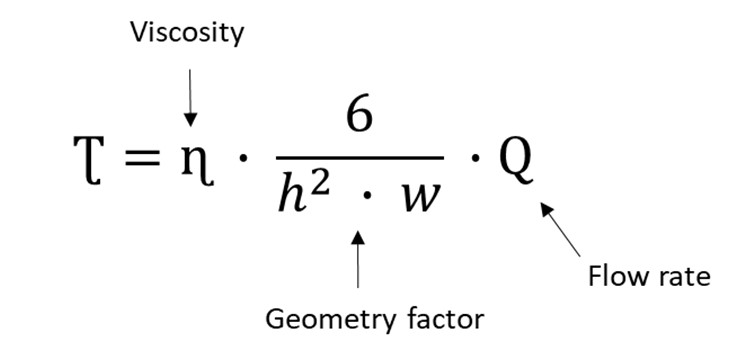 where Q is the flow rate, ɳ is the hydrodynamic viscosity, w and h are the width and the height of the flow channel.
To calculate one from the other, several factors must be considered, including:
- Channel height
- Channel width
- Channel length
- Fluid viscosity
Because these variables differ between microfluidic devices, performing the calculations manually can be time-consuming and prone to errors.
A Simple Shear Stress Calculator for Beonchip Devices
To simplify this process, we developed an online Shear Stress Calculator. This tool allows you to calculate either the shear stress generated by a specific flow rate or the flow rate required to achieve a desired shear stress.
The calculator automatically uses the dimensions of your selected Beonchip microfluidic chip. It also considers the viscosity of the culture medium, providing accurate and reliable calculations in just a few clicks.
How to Use the Calculator
Using the calculator is straightforward.
First, select the Beonchip chip you are using. If you are working with one of our standard devices, the channel dimensions are automatically loaded.
If you are using a custom microfluidic device, simply enter the channel height and width that correspond to your design.
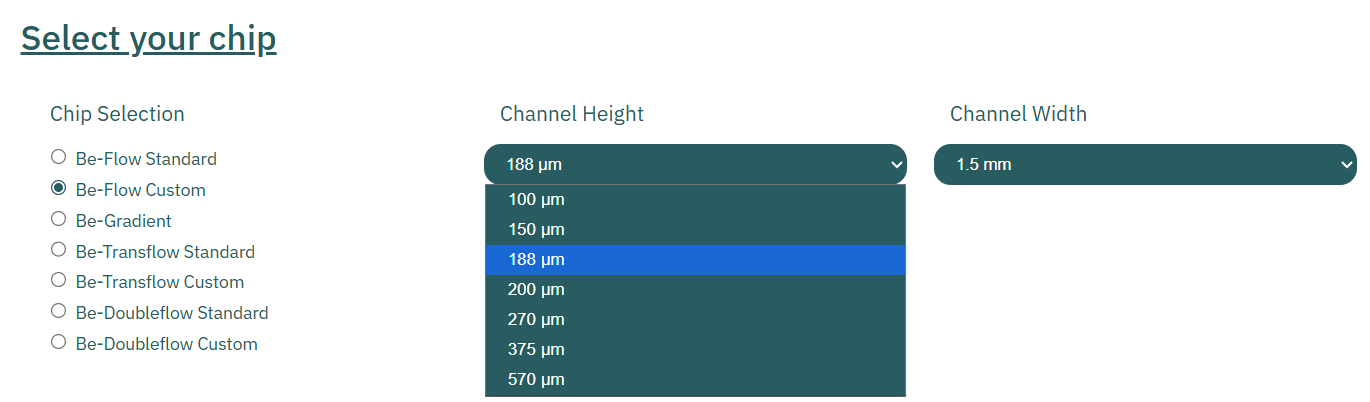
Figure 1: Selection of the chip being used. Example: a Be-Flow Custom with a channel height of 188 µm and a channel width of 1.5 mm.
Next, choose the viscosity that best matches the fluid you plan to perfuse. Several common media and solutions are already available in the calculator [1].
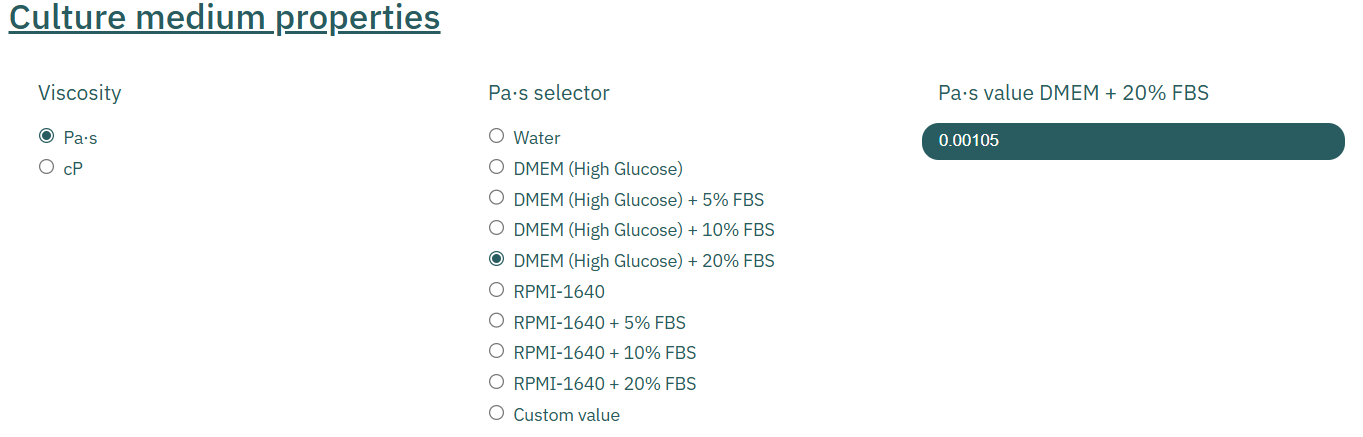
Figure 2: Selection of the culture medium properties. Example: selecting the viscosity in Pa per second and then DMEM (High Glucose) + 20% FBS media. The viscosity value on the left appears automatically. Source [1].
Finally, decide which parameter you want to calculate:
- Shear Stress: Enter the flow rate applied by your perfusion system.

- Flow Rate: Enter the target shear stress you want to reproduce.

The calculator will instantly provide the corresponding value.
Start Calculating
You can access the Beonchip Shear Stress Calculator in our Knowledge Center here.
Whether you are optimizing an existing experiment or designing a new organ-on-chip study, this tool helps you quickly determine the appropriate flow conditions while minimizing calculation errors. In addition, we invite you to check our other posts, particularly this guide, where you can learn more about the custom options of our devices.
If you have any questions about selecting the right shear stress or using our microfluidic chips, feel free to contact us at info@beonchip,com. Our team will be happy to help.
Reference
[1] Poon, C. (2022). Measuring the density and viscosity of culture media for optimized computational fluid dynamics analysis of in vitro devices. Journal of the Mechanical Behavior of Biomedical Materials, 126, 105024.
Authors: Inês Pereira (ORCID) and Sandra González (ORCID).